skip to main |
skip to sidebar
Home »
Posts filed under YouTube Tips
How to set custom URL to YouTube Channel.Why we change url of over channel? We set custom username only for the visitors because its difficult to find our channel with the long url so if we set custom url so visitor easily found our channel on YouTube.
It is much important for Channel customization.Short url always to be a good link.
Can i change my url again after setting custom url? No you cannot change your channel username after setting first time.
Another YouTube Tip Here
How to Change YouTube Username?
1 - Sigh in YouTube.
2 - Click on the YouTube Setting.
3 - Click on the Advanced.
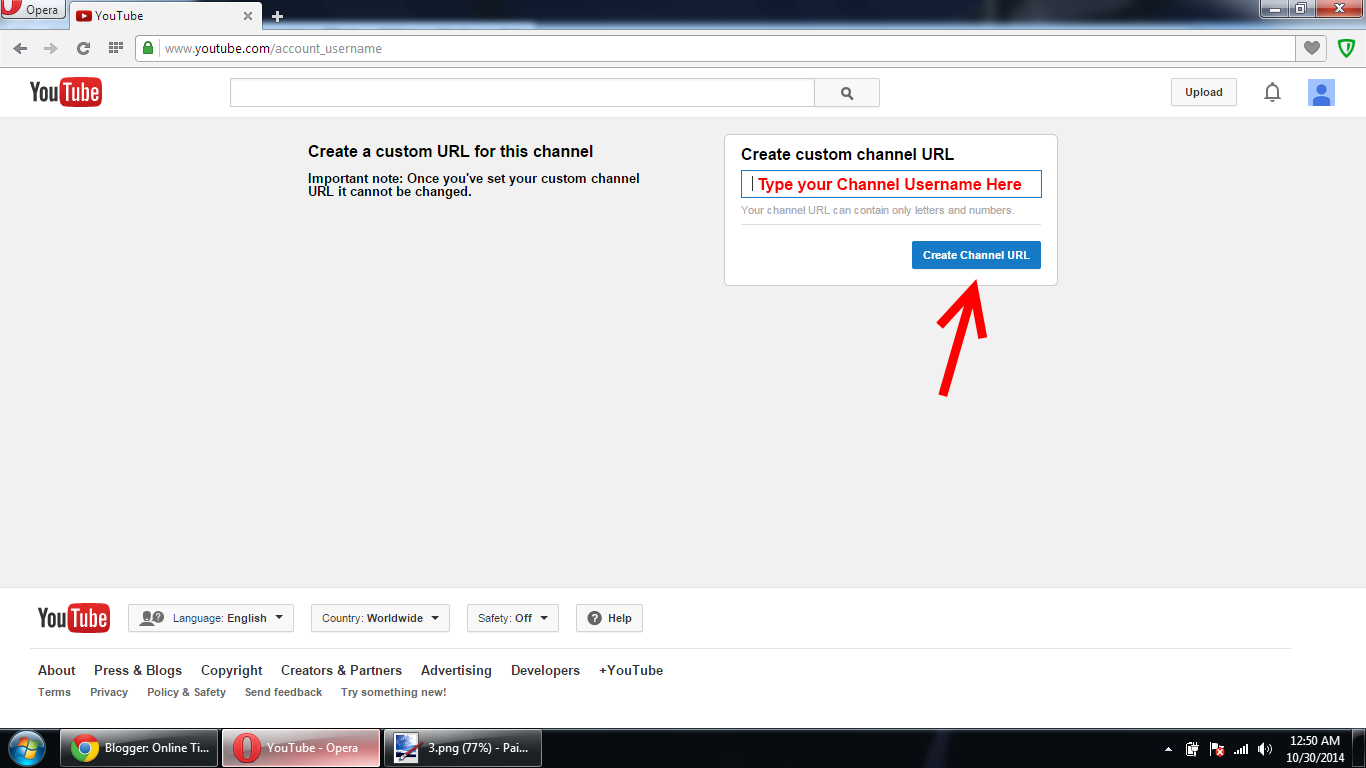
4 - Then click on the "Create custom URL"
5 - Type your username then click on create channel url.
Images Previews:
Note: If you have facing any problem about this article then feel free to leave your problem in comments box.
In this article you will learn how to fix Not Monetized Click to Provide Commercial Use Rights on YouTube.This error now become a common error on YouTube.Some peoples think that this is a glitch but this is not a glitch.This error occurs due to duplication of Video and Copyright content.
If you have full rights for video then you will resolve it but 80% chances YouTube reject your documentation.
Many peoples try many tricks to resolve it like Cropping, Add Animations, Effects, Audio Editing etc but all tricks failed.So there are only one solution to resolve this error.
For fix this error you need to join YouTube Partnership Networks.YouTube Networks provide full rights for your videos to monetized on YouTube.There are many Networks which provide rights for videos but videos not be copyrighted or not match third party content.Network sighed a contract with you for give rights.
Best YouTube Partnership Networks:
1 - Fullscreen
2 - Machinima
3 - Freedom
4 - Quizgroup
5 - RPM
Before applying for Partnership you must know about Networks requirements which is important for you.
Networks Requirements:
1 - Fullscreen [Quality Videos]
2 - Machinima [500 Subscriber, 500 Views per day, Quality Videos]
3 - Freedom [Only 1000 Views per month]
4 - Quizgroup [500 Views per month only]
5 - RPM [1000 Views per month only]
How will be you paid after joining Network?Commonly all the networks pay you through PayPay you must have a PayPal account for withdraw money from Networks.Your all earning goes in Networks owner then he charge his commission and send your reaming earnings in your PayPal account.So feel free and apply your channel for get the rights.
Note: If you have any questions or need any information about this article then feel free to contact me so leave your problem in comments box.Thanks for reading.
Now YouTube ask for Rights when monetized your Video and error comes like this "Not Monetized Click to Provide Commercial Rights".This error appears when your video is copyrighted or duplicate.
But many channel upload same video on YouTube and get monetized. How this possible? so don`t confused i have a simple solution for this.
For getting monetized you need to change you YouTube Network.There are many YouTube Networks who provide commercial rights on Copyrighted video.So i suggest you to change your YouTube Network from Google Adsense to other Networks.
So i suggest you change your Network and continue working on your Channel.But after changing network you will withdraw your money through PayPal not through Western Union.
Top High Pay YouTube Networks below
1 - Fullscreen
2 - IGN
3 - Machinima
4 - Freedom
5 - RPM
6 - TGN
YouTube Networks Requirement
1 - Fullscreen (Need quality videos only)
2 - IGN (Big channels and Quality videos)
3 - Machinima (500 Subscribers, 500 Views per day and Quality videos)
4 - Freedom (1000 views per month)
5 - RPM (1000 views per month)
6 - TGN (1000 Subscribers, 166 views per day, Quality videos)
If this article is helpful for you then don`t forget to feedback or if you have any question leave your problem in comments.
Now a days YouTube is most popular way to earn money.Earn from YouTube is not difficult you must have following things:
1 - Good and Quality Video (Not Copyrighted)
2 - Good Topic (High Searches)
3 - Google Adsense (If you have adsense then it`s good if not then contact me).
Now i will tel you how to earn money from YouTube and become YouTube partner.
How to become YouTube Partner? Follow these steps.
1 - Gmail Account (New or old one).
2 - Log in YouTube.
3 - Create a channel.
4 - Upload at least 3 to 4 videos.
5 - Go to Channel Setting>Advance>Change the Country "United State">Save>Status and Features>Enable Monetization>Check the three box>Got it>Done!
6 - Now go to Video Manager silver $ icons appears on the right side of the video click on $ then click on monetization check the first 2 box or save.
7 - For withdraw money you need to associate Google Adsense account (If you have Adsense if not then contact me for get Adsense.
If you have problem on Questions feel free to email me
arslan.hussain321@gmail.com